

WordPress database error: [Disk full (/tmp/#sql_23e1_0.MAI); waiting for someone to free some space... (errno: 28 "No space left on device")]
SHOW FULL COLUMNS FROM `wp_options`


Warning: mysqli_query(): (HY000/1021): Disk full (/tmp/#sql_23e1_0.MAI); waiting for someone to free some space... (errno: 28 "No space left on device") in /var/www/vhosts/pod-w.com/httpdocs/wp-includes/wp-db.php on line 2056

WordPress database error: [Disk full (/tmp/#sql_23e1_0.MAI); waiting for someone to free some space... (errno: 28 "No space left on device")]
SELECT t.*, tt.*, tr.object_id FROM wp_terms AS t INNER JOIN wp_term_taxonomy AS tt ON t.term_id = tt.term_id INNER JOIN wp_term_relationships AS tr ON tr.term_taxonomy_id = tt.term_taxonomy_id WHERE tt.taxonomy IN ('resource_category') AND tr.object_id IN (2423) ORDER BY t.name ASC

How to add a new title for retail in BookVAULT | Printondemand-worldwide
Warning: mysqli_query(): (HY000/1021): Disk full (/tmp/#sql_23e1_0.MAI); waiting for someone to free some space... (errno: 28 "No space left on device") in /var/www/vhosts/pod-w.com/httpdocs/wp-includes/wp-db.php on line 2056

WordPress database error: [Disk full (/tmp/#sql_23e1_0.MAI); waiting for someone to free some space... (errno: 28 "No space left on device")]
SELECT wp_posts.* FROM wp_posts INNER JOIN wp_postmeta ON ( wp_posts.ID = wp_postmeta.post_id ) INNER JOIN wp_postmeta AS mt1 ON ( wp_posts.ID = mt1.post_id ) WHERE 1=1 AND ( wp_postmeta.meta_key = '_elementor_priority' AND ( ( mt1.meta_key = '_elementor_location' AND mt1.meta_value = 'elementor_head' ) ) ) AND wp_posts.post_type = 'elementor_snippet' AND ((wp_posts.post_status = 'publish')) GROUP BY wp_posts.ID ORDER BY wp_postmeta.meta_value+0 ASC

View all

Resource Centre

How to add a new title for retail in BookVAULT

Introduce a title into our retail/wholesale system for additional revenue.

BookVAULT also gives you access to real-time sales reporting 24/7 via the ‘My Account’ page.

Click on each image to see a larger version.

1. Once you have logged in to your account, navigate to the ‘Add a Book’ page.

2. Fill out the corresponding input fields with your book’s information. Hover over the small question mark boxes to display more information about the specific field. A genuine ISBN is required for retail books.

3. Click on the ‘Wholesale Title’ checkbox and fill out the new fields that are displayed. Once done, click the ‘Add This Book’ button.
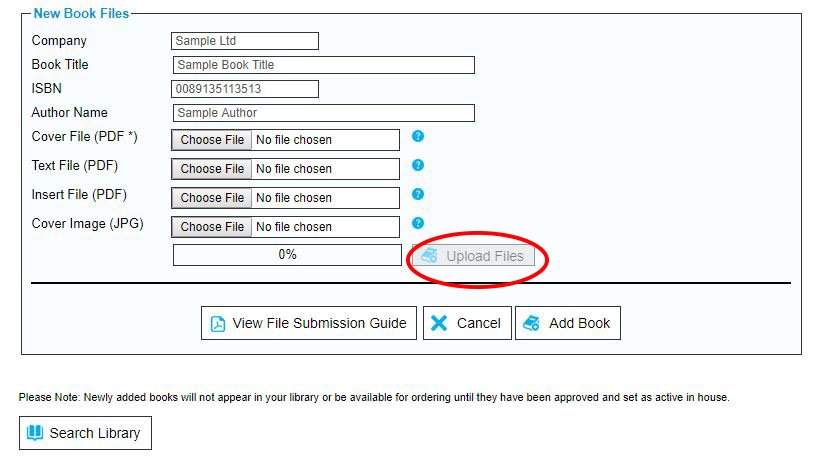
4. Upload the PDF files for the book by clicking on the relevant ‘Choose file’ boxes. Click on the ‘View File Submission Guide’ button to access a document with guidelines on the criteria your files must meet. Click on the ‘Upload Files’ button to complete.

To learn how to prepare and save your files, read our guide How to optimise your files.


Warning: mysqli_query(): (HY000/1021): Disk full (/tmp/#sql_23e1_0.MAI); waiting for someone to free some space... (errno: 28 "No space left on device") in /var/www/vhosts/pod-w.com/httpdocs/wp-includes/wp-db.php on line 2056

WordPress database error: [Disk full (/tmp/#sql_23e1_0.MAI); waiting for someone to free some space... (errno: 28 "No space left on device")]
SELECT wp_posts.* FROM wp_posts INNER JOIN wp_postmeta ON ( wp_posts.ID = wp_postmeta.post_id ) INNER JOIN wp_postmeta AS mt1 ON ( wp_posts.ID = mt1.post_id ) WHERE 1=1 AND ( wp_postmeta.meta_key = '_elementor_priority' AND ( ( mt1.meta_key = '_elementor_location' AND mt1.meta_value = 'elementor_body_end' ) ) ) AND wp_posts.post_type = 'elementor_snippet' AND ((wp_posts.post_status = 'publish')) GROUP BY wp_posts.ID ORDER BY wp_postmeta.meta_value+0 ASC