

WordPress database error: [Disk full (/tmp/#sql_23e1_0.MAI); waiting for someone to free some space... (errno: 28 "No space left on device")]
SHOW FULL COLUMNS FROM `wp_options`


Warning: mysqli_query(): (HY000/1021): Disk full (/tmp/#sql_23e1_0.MAI); waiting for someone to free some space... (errno: 28 "No space left on device") in /var/www/vhosts/pod-w.com/httpdocs/wp-includes/wp-db.php on line 2056

WordPress database error: [Disk full (/tmp/#sql_23e1_0.MAI); waiting for someone to free some space... (errno: 28 "No space left on device")]
SELECT t.*, tt.*, tr.object_id FROM wp_terms AS t INNER JOIN wp_term_taxonomy AS tt ON t.term_id = tt.term_id INNER JOIN wp_term_relationships AS tr ON tr.term_taxonomy_id = tt.term_taxonomy_id WHERE tt.taxonomy IN ('resource_category') AND tr.object_id IN (2384) ORDER BY t.name ASC

How to optimise your files | Printondemand-worldwide
Warning: mysqli_query(): (HY000/1021): Disk full (/tmp/#sql_23e1_0.MAI); waiting for someone to free some space... (errno: 28 "No space left on device") in /var/www/vhosts/pod-w.com/httpdocs/wp-includes/wp-db.php on line 2056

WordPress database error: [Disk full (/tmp/#sql_23e1_0.MAI); waiting for someone to free some space... (errno: 28 "No space left on device")]
SELECT wp_posts.* FROM wp_posts INNER JOIN wp_postmeta ON ( wp_posts.ID = wp_postmeta.post_id ) INNER JOIN wp_postmeta AS mt1 ON ( wp_posts.ID = mt1.post_id ) WHERE 1=1 AND ( wp_postmeta.meta_key = '_elementor_priority' AND ( ( mt1.meta_key = '_elementor_location' AND mt1.meta_value = 'elementor_head' ) ) ) AND wp_posts.post_type = 'elementor_snippet' AND ((wp_posts.post_status = 'publish')) GROUP BY wp_posts.ID ORDER BY wp_postmeta.meta_value+0 ASC

View all

Resource Centre

How to optimise your files

Follow the steps below to optimise your pdf before saving and submitting to us for print. By making these changes you will ensure that unnecessary extra information isn’t retained within the PDF – ensuring the file size is more practical.

To learn how best to supply your files, read our guide How to supply your files.

Click on each image to see a larger version. Download a printable pdf version of this guide here: Guide to Optimising Files

1. Open PDF file in Adobe Acrobat
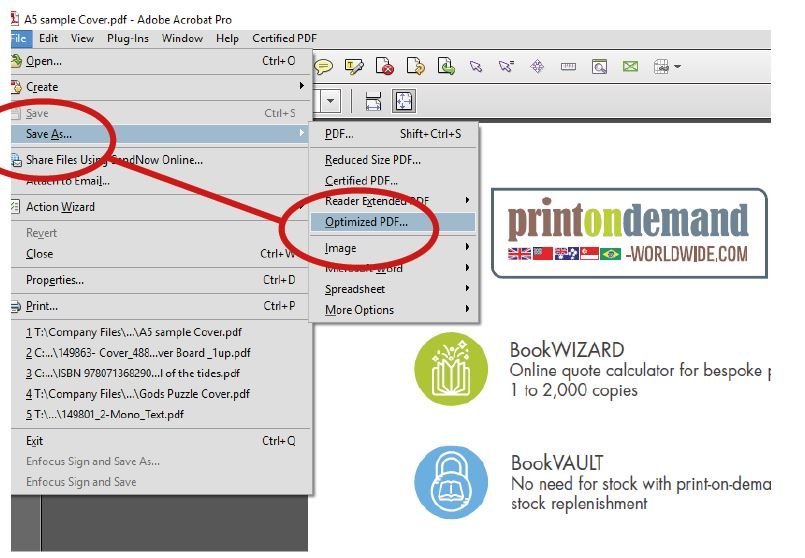
2. Save the file as Optimised PDF

3. Select ‘images’ to view pixels per inch

4. Change PPI to 300 over all images

5. Select ‘Fonts’ to Embbed fonts into the PDF
(Preventing any unwanted changes to fonts)
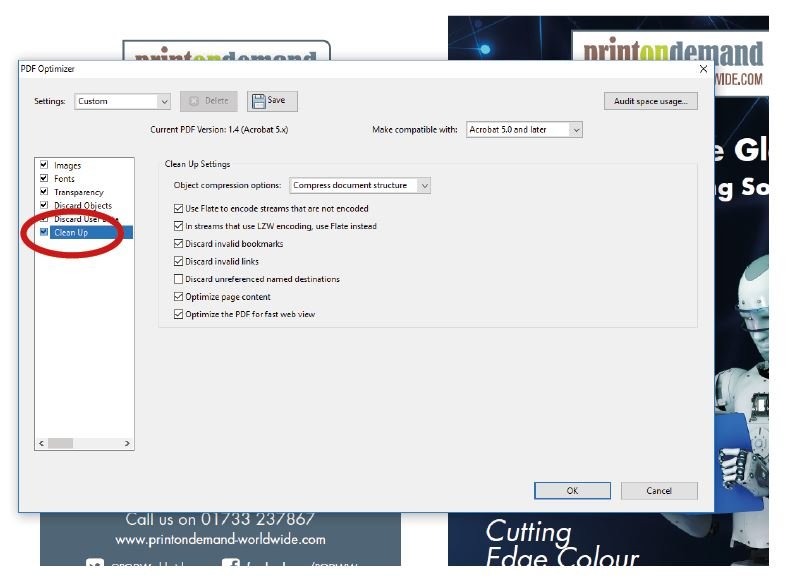
6. Select ‘Clean Up’ this can help reduce the file size

7. Change the PDF version to Acrobat 5.0

8. Discard objects
To ensure any extra text or images outside the PDF are cleared
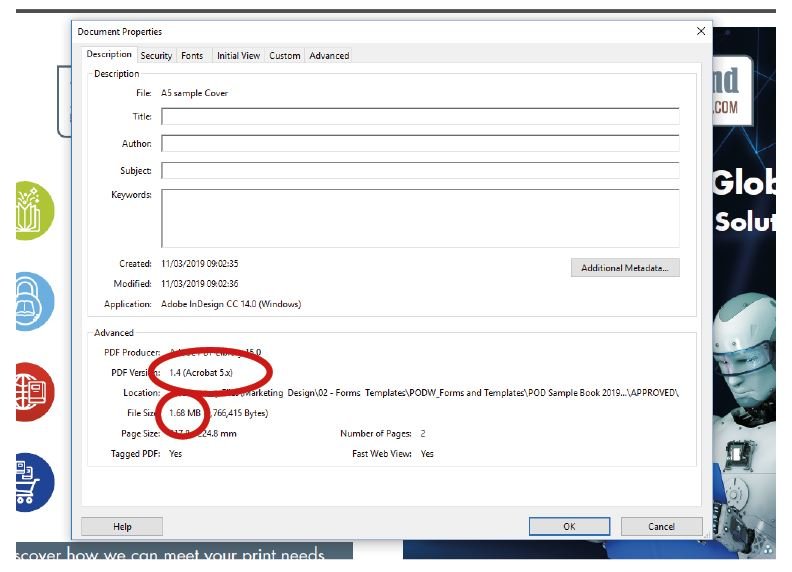
9. CTRL + D
As a final check to see if the file is the correct version and size

10. Finally, confirm and Save as a PDF



Warning: mysqli_query(): (HY000/1021): Disk full (/tmp/#sql_23e1_0.MAI); waiting for someone to free some space... (errno: 28 "No space left on device") in /var/www/vhosts/pod-w.com/httpdocs/wp-includes/wp-db.php on line 2056

WordPress database error: [Disk full (/tmp/#sql_23e1_0.MAI); waiting for someone to free some space... (errno: 28 "No space left on device")]
SELECT wp_posts.* FROM wp_posts INNER JOIN wp_postmeta ON ( wp_posts.ID = wp_postmeta.post_id ) INNER JOIN wp_postmeta AS mt1 ON ( wp_posts.ID = mt1.post_id ) WHERE 1=1 AND ( wp_postmeta.meta_key = '_elementor_priority' AND ( ( mt1.meta_key = '_elementor_location' AND mt1.meta_value = 'elementor_body_end' ) ) ) AND wp_posts.post_type = 'elementor_snippet' AND ((wp_posts.post_status = 'publish')) GROUP BY wp_posts.ID ORDER BY wp_postmeta.meta_value+0 ASC